

Your Data Is In The Warehouse. The Model That Makes It Useful Isn’t. Introducing Kaiya Architect.
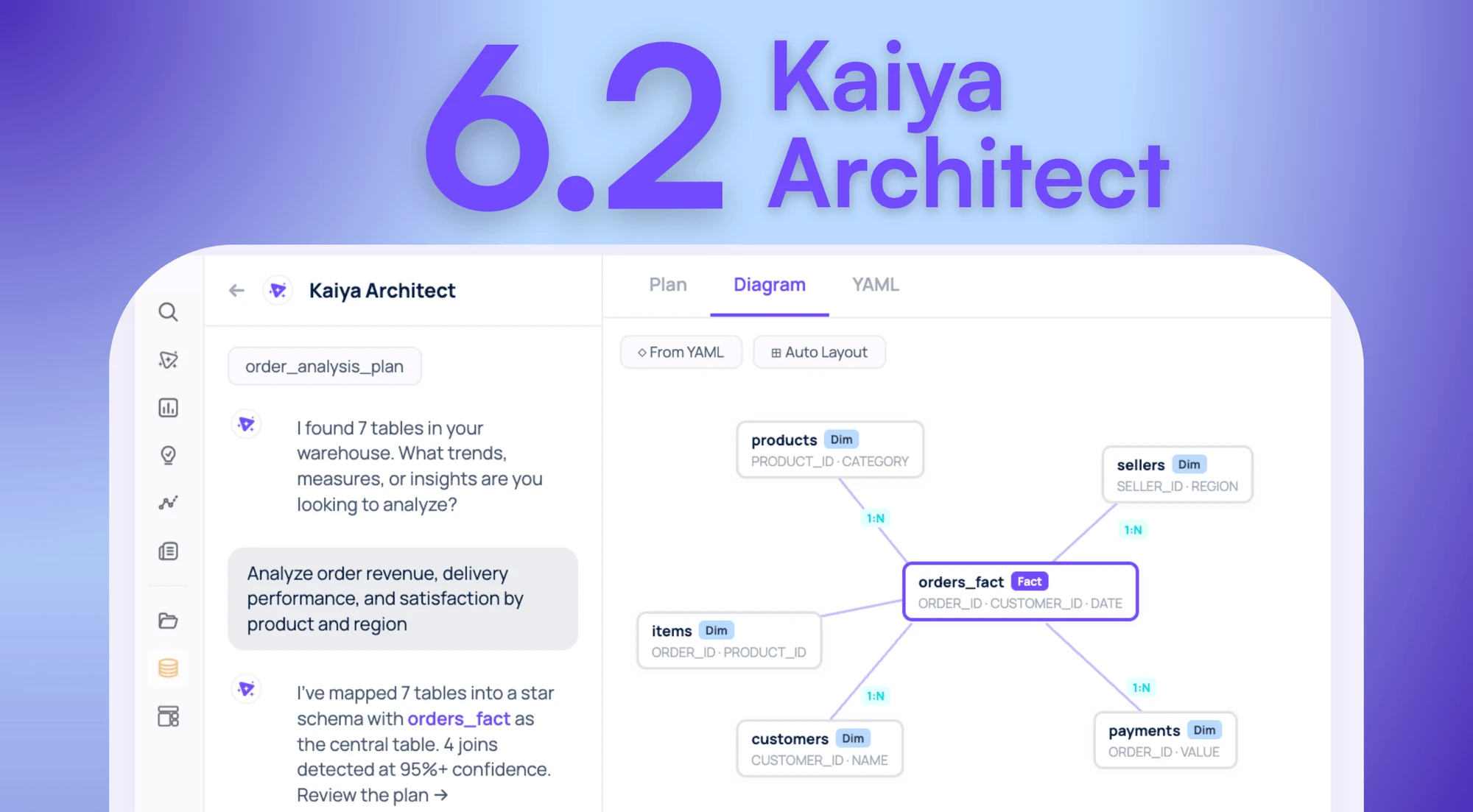

What is Kaiya Architect?
Kaiya Architect is an AI data modeling agent that builds governed semantic layers from raw structured data sources through conversation. It handles the full modeling lifecycle in a single session: warehouse discovery, join inference, column classification, metadata enrichment, validation, and deployment. You describe the business need, review the proposed plan, approve the publish. Unlike manual workflows that spread this process across multiple tools and teams over days or weeks, Architect produces a validated, deployed, production-ready data model where the design is the implementation. Nothing ships without human approval at every checkpoint.
Here’s why we built it and how it works.
The problem on both sides of the ticket
Your warehouse has the data. You know what you need to analyze. Between you and that analysis is a data model that doesn’t exist yet, and a multi-week queue to get one built.
Every real enterprise analysis requires a data model underneath it: tables joined correctly, columns classified as measures or dimensions, metrics defined with business logic, grain mismatches resolved. Without that foundation, nothing downstream works reliably, not the natural language queries, not the analytic apps, not the automated reports. You can’t skip the modeling step. You can only wait for it.
Today, that wait looks like this. File a Jira ticket describing what you need. Enter the data engineering backlog. Wait 3 to 15 days depending on the team’s capacity and competing priorities. A data engineer picks up the request, browses schemas manually, configures joins across multiple UI modules, classifies columns, writes calculated metrics, validates by running test queries, publishes, and maybe documents it afterward if there’s time. The analyst who filed the ticket starts their actual work two weeks after they identified the need.
This isn’t a skills gap. The business user knows the question. The data exists in Snowflake. The bottleneck is structural: building the model that makes warehouse data queryable takes specialized work, and there aren’t enough people to do it at the pace organizations need.
And the business user doing this isn’t going rogue. Every model Architect builds goes through the same validation and approval gates as one built manually. The data team retains full authority over what goes live. This is the same governed process, faster.

On the other side of that Jira ticket: a data engineer whose sprint just got consumed by modeling requests. The pipeline reliability work that would prevent next month’s data quality incident? Pushed to next sprint. Every manual model build follows the same repetitive pattern. The steps are predictable. The work is important. But 80% of it follows patterns an AI agent can handle, which frees the engineer for the 20% that requires actual judgment: governance decisions, edge case resolution, pipeline architecture.
The pressure is also increasing in a specific way. With LLMs and AI agents becoming the primary interface to enterprise data, the semantic layer has to be right. A bad join or a misclassified column produces a wrong AI-generated insight that propagates to every app, every scheduled report, every executive inbox at machine speed. Getting structured data modeled correctly isn’t optional anymore. It’s the foundation that determines whether your AI actually works.
Same bottleneck, two sides. That’s what Architect is for.
How Kaiya Architect works
We’ll walk through the full workflow using one example: a category manager at a CPG company needs to analyze brand performance across retail channels. The data lives in Snowflake. Four tables: weekly POS sell-through, monthly trade spend allocations, a retailer master, and a promo calendar. Two different grains (weekly and monthly), a join path that’s obvious to a human but ambiguous to an LLM.
How Architect discovers your data
You don’t start by naming tables. You describe what you need: “Brand performance by retailer, including promo lift and trade spend efficiency.”
A sandboxed Explore agent scans your live Snowflake warehouse and maps what’s relevant. The agent is read-only. It can’t modify anything, and that’s by design: the agent that explores your data and the agent that builds models are separate, with separate permissions. It finds tables, reads schemas, checks for existing models, and identifies what matches the description. Our category manager didn’t know the table was called fact_pos_weekly_v3. They didn’t need to.
For data engineers: Architect connects to your production warehouse with read-only access. Nothing moves. If your team has already built dbt models on top of those raw tables, Architect finds those too. It reads from whatever layer you’ve invested in, whether that’s raw, staging, intermediate, or marts. It doesn’t redo transformation work. It picks up where your engineering left off.
In our example, Architect finds the four tables and flags a grain mismatch: POS data is weekly, trade spend is monthly. It notes this for resolution in the next phase rather than silently ignoring it.
How Architect plans before it builds
Architect doesn’t build the moment it discovers your tables. It writes a plan first.
The plan specifies which tables will be joined, on which keys, with which cardinality assumptions. For our CPG example, it also surfaces the grain mismatch decision: aggregate POS up to monthly to match trade spend, or distribute trade spend to weekly for more granular analysis? Architect presents both options with a plain-language explanation of what each approach gains and loses. The category manager picks the one that matches how their team actually reviews performance.
When Architect encounters ambiguity, it asks clarification questions with pre-populated options. Multiple valid join keys? It presents the candidates. Unclear business terms? It asks what you mean. The user makes the call without writing SQL or interpreting schema diagrams.
This is the first of two human approval checkpoints. If a data engineer wants to review the approach before anything gets built, the plan is their checkpoint. Same dynamic as a PR review: the plan is the diff, approval is the merge.
How Architect builds and exposes the YAML
Once the plan is approved, Architect starts building. You watch it happen.
The model takes shape in a split-pane view: visual join diagram on the left showing table relationships and cardinality labels, structured YAML on the right with every column classification, join key, and calculated metric spelled out.
Columns get auto-classified. Revenue: measure, SUM aggregation. Region: dimension. Join keys get inferred with cardinality labels (retailer_id, N:1 from fact to dimension). Calculated metrics get generated from natural language: “promo lift equals promoted-week sales minus baseline, divided by baseline” becomes a row-level formula in the YAML.
If your team maintains a data dictionary, a dbt schema.yml, or any structured reference with column descriptions, Architect imports those definitions as the source of truth and fills only what’s undocumented. Every model ships with complete metadata as a byproduct of the build process, not as a documentation exercise someone does six months later when nobody remembers what active_flag means.
Everything stays in Draft state. Your data engineer can inspect the YAML line by line. This is the second human approval checkpoint.
The distinction that matters for technical buyers: the YAML Architect produces isn’t a spec that someone else implements. It IS the implementation. There is no gap between what you reviewed in Draft and what runs in production. Unlike design tools where the schema diagram and the deployed model are different artifacts maintained by different people, Architect’s output is the live, queryable semantic layer the moment you approve it.

How Architect validates before and after publish
Most platforms validate syntax. Architect validates correctness.
Three independent layers run before anything goes live. Structural: does the YAML parse, do all references resolve, are display names unique? Semantic: do the join columns actually exist in the table metadata, are cardinalities plausible, do calculated column source fields exist? Server-side dry run: the full production execution path runs against real data with no side effects. If something would break in production, it breaks here instead.
When validation catches something, Architect proposes a fix, not a flag. Mismatched join key casing between your warehouse and the config? Resolved automatically. A missing dimension table reference? Surfaced with the SQL to verify.
After the user approves and publishes, nine automated quality checks run against the live model. Each one targets errors that typically go undetected for weeks.
Null analysis catches columns that are unexpectedly empty. Double counting detection flags records that inflate aggregates through join expansion. Fan trap detection identifies join paths that silently produce totals 2x or 3x too high. (This is the error that makes a VP’s board deck show territory revenue at triple the actual number. Nobody catches it until it’s too late.) Chasm trap detection catches the inverse: join paths that silently drop records. Join cardinality verification confirms N:1 assumptions hold against actual data. Formula validation tests every calculated metric. Join key integrity checks referential consistency. Row count comparison validates records aren’t being dropped. Data type consistency catches mismatches between the model’s expectations and the warehouse.
Every issue surfaces with the SQL for each fix option. The model passes or it doesn’t.

Editing existing models and long sessions
Architect handles maintenance too. Any published model can be serialized back to YAML, modified in conversation (“add a year-over-year growth column,” “change the join key on the retailer table”), and re-published through the same validation pipeline. The same governed process, whether you’re building or maintaining.
One practical detail: data modeling conversations are long. A complex model might take 30+ turns. Architect handles sessions of 50+ turns without losing context. State persists after every turn. You can close your laptop, come back tomorrow, pick up where you left off.
Making your data LLM-ready
Here's a reality most data teams haven't fully reckoned with: in the age of LLMs and AI agents, clean data isn't enough. Your data needs to be LLM-ready.
What does that mean? It means your structured data has to be modeled, classified, and enriched with enough semantic context that an AI agent can reason over it correctly without a human translating every query. Column names need to be intelligible. Joins need to be unambiguous. Metrics need consistent definitions that propagate across every consumer of that data, whether it's a dashboard, an agentic workflow, or an executive asking a question in natural language.
Most organizations aren't there yet. Data lives in silos: some in Snowflake, some in S3, some in legacy Hadoop clusters. Even when it's consolidated, harmonization is incomplete. The same metric is defined three ways in three tools. Column names are cryptic abbreviations from a migration five years ago. Join paths are tribal knowledge held by two engineers who onboarded before the reorg.
None of this matters when humans are the only ones interpreting the data. A skilled analyst knows that rev_amt_adj means adjusted revenue and that the territory table joins on a composite key. But an LLM doesn't know that. And when LLMs and agents become the primary interface to enterprise data, every gap in your semantic layer becomes a wrong answer delivered at machine speed.
This is what Architect solves at the foundation level. Every model Architect builds ships with complete metadata: column classifications, business-friendly names, metric definitions, join cardinality labels, and grain documentation. It doesn't just connect tables. It makes them legible to AI. The semantic layer Architect produces isn't just queryable by humans. It's queryable by any LLM or agent that connects to it, with the context needed to get the answer right.
Persistent Memory compounds this further. Every correction, every business rule, every domain-specific definition your team provides gets embedded and propagated. The semantic layer doesn't just describe your data. It teaches every downstream AI consumer how your organization thinks about that data. That's what LLM-readiness actually requires: not just clean tables, but a governed, enriched, semantically complete layer that AI can reason over without guessing.
Where Architect fits in your existing stack
Data engineers ask this first, so here’s the direct answer.
Architect sits above your dbt marts, above your warehouse, below your BI and consumption tools. It reads from whatever clean or semi-clean layer your team has already built and creates the governed semantic layer on top. It doesn’t replace dbt. dbt gets you clean, tested transforms. Architect adds what dbt can’t automate: column classification, join path detection with cardinality validation, fan trap detection, and a correction memory layer that propagates metric definitions org-wide.
Tellius is an agentic analytics platform purpose-built for enterprise data teams. Architect is how you get your structured data ready for that platform’s full analytical stack. If you have Collibra for governance, Architect reads from it. If you use LookML, Architect inherits your definitions. If your team maintains a data dictionary or MetricFlow metrics, those become the starting point. No parallel universe. Everything builds on what’s there.
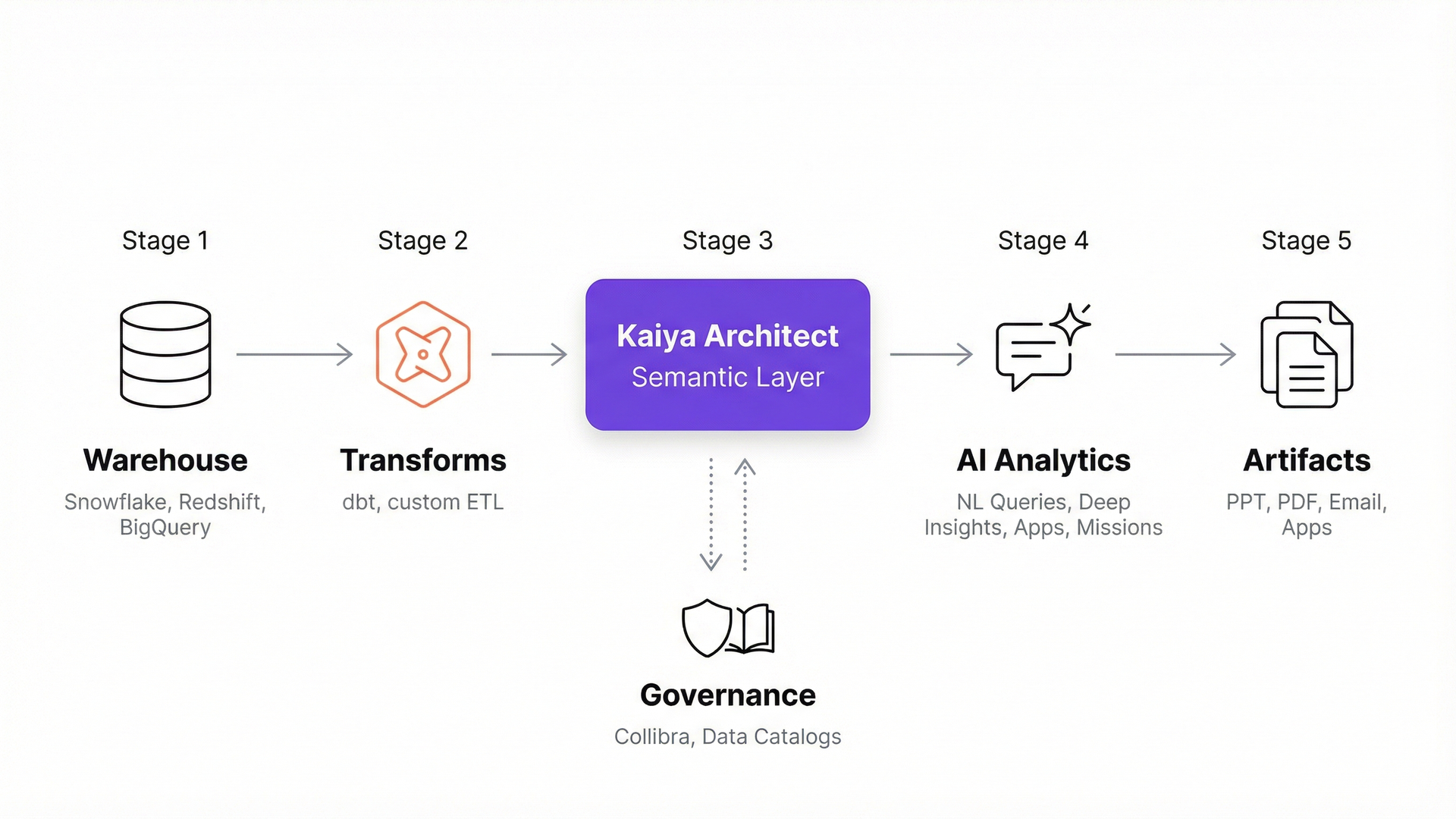
The moment a model publishes, the full Tellius analytical stack is available against it. Natural language queries, cross-data root cause analysis, deep insights, interactive analytic apps, scheduled investigations with board-ready deliverables, and PowerPoint export. One build step. No separate deployment phase.
How Architect compares to other modeling approaches
There are plenty of ways to build a data model. The relevant question isn’t which tool is best in the abstract. It’s which approach closes the gap between designing a model and having a production-ready analytics layer.
To be clear about the dbt row: dbt is excellent at what it does. If your team has invested in dbt transforms and MetricFlow definitions, that work becomes Architect’s starting point, not something Architect replaces. The same is true for enterprise architecture tools. If your organization uses erwin for documentation and modeling governance, Architect doesn’t replace that upstream work. It eliminates the downstream bottleneck between a finished design and a production analytics layer.
What this looks like in practice
During early access, a Tellius design partner in pharma (a mid-size commercial analytics team supporting six brands) used Architect to build the data models their field analytics program runs on. Their data engineering team had a standing backlog of 15+ modeling requests. Each request followed a 2-to-3-week cycle: requirements gathering, manual build, validation rounds, publish.
In the first two weeks with Architect, the analytics team built and published 8 models. The data engineers reviewed and approved each one through Architect’s plan and YAML checkpoints. Three of those models surfaced join issues, including a fan trap that would have inflated territory-level totals by roughly 2.5x, caught by the post-publish quality checks before any analyst ran a query against the data.
The data engineers still reviewed and approved every model. What changed is they stopped spending their weeks building them from scratch. The backlog dropped, and the commercial team got access to analytics that had been sitting in a queue for months.
Part of what made this work: Architect brings domain awareness to the modeling process. When the pharma team connected prescription data, Architect recognized standard IQVIA data patterns (TRx/NRx structures, territory-to-brick hierarchies, specialty classifications) and proposed joins and metric formulas that matched how the analytics team had been building them manually for years. It didn’t ask “what’s a TRx?” It proposed what a senior analyst would have proposed, and the team confirmed or corrected.
Combined with Tellius’s Persistent Memory (which carries forward every metric definition, business rule, and correction the team provides), the institutional knowledge compounds. The tenth model Architect builds takes less conversation than the first, because every correction from the first nine is already embedded.
What data engineering teams reading this might think
If you’ve read this far and still have questions, you’re probably a data engineer. Fair. Here are the ones we hear most.
“How do I know the model is correct?”
Five validation layers before publish. Nine automated quality checks after. Specifically targeting fan traps that inflate totals, join key casing mismatches, missing dimension tables that cause duplicate rows, division-by-zero in metric formulas. Every issue surfaces with the fix before any user sees a number.
“Doesn’t this create shadow analytics?”
Two explicit human approval checkpoints: plan approval before any YAML is generated, publish approval after validation. The YAML is fully reviewable in Draft. If you want a data engineer to sign off on every publish, configure that workflow. Architect automates the build. Your team retains governance.
“We spent months on our dbt models. Does this throw that away?”
No. Architect reads dbt output as its starting point: column definitions, MetricFlow metrics, documented relationships. It adds what dbt doesn’t automate: column classification, join path detection, cardinality validation, fan trap detection, correction memory. Your dbt investment is the foundation.
"Our data is already clean. Why do we need this?"
Clean data is a great start, but it's not the finish line. Architect adds what clean tables alone don't provide: column classification, business-friendly metadata, join path validation, metric definitions, and the semantic enrichment that makes your data queryable by LLMs and AI agents, not just by analysts who already know the schema. If your data is clean, Architect makes it LLM-ready. If it's already modeled, Architect adds the validation and correction memory layer that keeps it correct as schemas evolve and new consumers connect.
“What happens when schemas change?”
Schema changes surface for human review. Nothing breaks silently. Nothing auto-incorporates without your sign-off.
“We already have a semantic layer.”
Your existing definitions stay as the source of truth. Architect reads and inherits them rather than redefining. Where no definition exists, Architect proposes one based on what it infers from the data and from industry patterns. Your team reviews. Persistent Memory propagates the approved definition to every user, every session, every AI agent. Definitions converge over time instead of drifting.
What comes next
Here’s the thing about AI-powered analytics: the natural language queries, the automated apps, the scheduled investigations your team runs are all downstream of the data model. If the semantic layer is wrong, every AI answer built on top of it is wrong too. At scale. Across every consumer of that data.
Architect exists to make sure that layer is right. One conversation. Five validation layers. Nine post-publish checks. Correction memory that gets smarter over time. And the moment you publish, the full analytical stack lights up against it, no separate deployment, no implementation handoff.
Get release updates delivered straight to your inbox.
No spam—we hate it as much as you do!


dbt handles data transformation and metric definition through code. Architect adds the layer dbt doesn’t automate: column classification, join path detection, cardinality validation, fan trap detection, and org-wide correction memory. Architect reads dbt output as its input.
Direct connection to Snowflake and Redshift in Live mode for real-time schema analysis and model creation. Other supported sources can be pre-loaded into Tellius and modeled from there. Architect works on structured data only.
No. If your team maintains definitions in LookML, Collibra, MetricFlow, or a data dictionary, Architect reads those as the source of truth and fills only gaps. It adds validation, classification, and correction memory on top of existing investments.
Three pre-publish layers (structural YAML validation, semantic join verification, server-side dry run) plus nine automated post-publish quality checks: fan traps, chasm traps, double counting, join cardinality, formula correctness, null analysis, join key integrity, row counts, and data type consistency.
Architect has two mandatory human approval checkpoints: plan approval before YAML generation, and publish approval before deployment. Organizations configure whether data engineering sign-off is required at either or both gates.
Traditional tools (erwin, SqlDBM) produce design diagrams that require separate implementation. Architect’s conversation produces the deployed, queryable model directly. The design and the production artifact are the same thing.
A fan trap occurs when a join path creates unintended one-to-many expansion that inflates aggregate values. Revenue might appear 2x-3x higher than actual. Fan traps are hard to catch manually because the numbers look plausible. Architect’s post-publish checks test for this pattern specifically.
Every metric definition, business rule, and correction your team provides is stored and applied in future sessions. Corrections propagate org-wide. The tenth model benefits from everything the team taught Architect during the first nine.
Architect detects schema changes on the connected warehouse. New columns, renamed tables, and dropped fields surface for review. Models don’t break silently, and changes aren’t incorporated without approval.
Yes. Any published model can be serialized to YAML, modified conversationally, and re-published through the same validation pipeline. Maintenance follows the same governed process as creation.
Depends on complexity. During early access, one design partner built 8 models in two weeks, work that previously took their engineering team roughly 10 weeks. Context management supports sessions of 50+ turns.
Tellius is an agentic analytics platform purpose-built for enterprise data teams. Kaiya Architect produces a validated, deployed semantic layer in one conversation. The full Tellius stack (natural language queries, deep insights, analytic apps, scheduled investigations) is immediately available against every published model.
How Tellius Kaiya Makes Data Interaction a Two-Way Street

Remember when Google revolutionized how we navigate the internet, shifting us from endless scrolling to quick searching? Today, AI models like ChatGPT are taking it a step further, turning our interactions into dynamic conversations rather than one-way commands.

How Kaiya Search Works: Uncovering the Magic Behind Our Supercharged Search
Discover how Tellius' AI-powered Kaiya Search transforms complex data into actionable insights, outshining generic LLMs with advanced natural language understanding and real-time analytics.